Need to create a password to login to a site but know you'll never remember the "suggested" entry the site offers?
Scrambleizer™ offers an alternative to the problem of creating new or re-using the same password for all log-ins or using different passwords but needing post-it notes in order to remember which is used where.
Scrambleizer™ uses your easy-to-remember password along with additional information from the login plus an optional two character "secret" to produce recreatable, random appearing passwords which you can easily recreate utilizing "Scrambleizer™" via the internet from anywhere at anytime. You may create distinct versions of each password/site/user combination through the optional "Secret" entry
Good practice in password selection is to include both complexity and length, with length being more important than complexity. A password of "aaaaa" or "1111" is too short, contains no complexity and will not scramble well, while "MyPassword123" is both longer and contains more complexity. It scrambles much better and creates a stronger password.
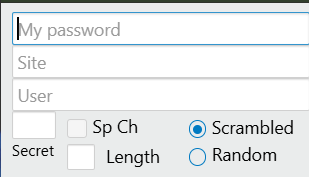
Enter your easy-to-remember (case sensitive) password e.g. "MyPassword123" along with the site name, e.g. gmail — (Do not include prefixes such as "http://" or "www", just the actual site name itself), and user name — e.g. robertsmith. You may also enter an optional "Secret". User name, site name and "Secret" are all case insensitive (no difference between upper and lower case).
Although current NIST recommendations do not require the entry of a special character, some sites require them. If you have included a special character in your original password data entry, which includes the first character of both site and user name, it will be included in the generated password. If your entered password does not include a special character, you may elect to have Scrambleizer™ generate and include one by selecting the "Sp Ch" checkbox entry. This works for both "Scrambled" and "Random" password generation.
Note: The password scrambling process utilizes the entire entered password - the password entry may contain spaces, however any trailing spaces are removed so as not to be inadvertaintly included. It is possible to create duplicate Scrambled or Random passwords based on the same entered password for site names and user names with identical leading characters.
"Secret" Your optional two character "secret" entry allows you to further distinguish the generated password utilizing information which will not automatically be contained in the resulting scrambled password, unless also present in the original entered information. Thus your "secret", as such, will not be visible to anyone who observes the final password. Your secret may be any 2 alphanumeric case insensitive entry. e.g. ab will result in the same randomization as AB or aB.
"Length" Optional = Length of the generated password, if a specific length other than the default is required.

You may elect to create either a "Scrambled" (uses only characters from your actual entry) or a totally "Random" character selection. Either may be re-created using your personal credentials

Version You may create up to four variations for each generated password/site/user (secret/special char) combination.
CreateThe Create selection uses your entered password, plus information from the site and user-name entries (and optionally your "secret") to create a repeatable scrambled pattern of letters and characters creating the appearance of a random password, which utilizes only the characters you entered, + an optional special character, if so indicated. You may re-create this password by entering the same credentials and selecting the same "version". Your "Secret", if entered, is utilized to introduce additional scrambling alternatives and does not appear in the password unless it was part of the previously enetered information.
For example the password "MyPassword123" at "gmail" used by "robertsmith" (No "Secret" - default length) will always generate:
The "Random" option allows you to create a totally random appearing password which utilizes uppercase, lowercase, numeric, and optionally a special character, (if included in the initial password). These "Random" appearing passwords will not necessarily include characters from your Password, User, or Site data entry.
The generated password will be displayed in the area below the "Create" "Copy", "Save", "Clear" and "Help" buttons.

Copy copies the generated password to the device Clipboard for your use.Save copies your entered data, in addition to the generated password, to the clipboard so you may save it if you desire. Clear clears all data entryHelp Opens this "Help" in a new browser window/tabThey could be reverse-engineered or re-created by someone who has your easy-to-remember "password" and login credentials.
However, if someone has the information necessary to re-create them, they are definitly not "secure".
Suggestions for use
Consistency is key. Use the same password entry consistently. If you use a "secret", use it consistently. Use the same length for each password generated. A reasonably diverse user password scrambles better. Current NIST (National Institute Of Science and Technology) recommendations favor length. It is much harder to break a longer password. Scrambleizer™ generates passwords using your entered information. If your entry information changes so will the generated password, thus you will not obtain the same scrambled result.